
How to Use ChatGPT Like a Pro: 15 Productivity Tips for 2026
Artificial intelligence has transformed the way people work, learn, and create. Among the many AI tools available today, ChatGPT stands out as one of the most versatile assistants for students, professionals, entrepreneurs, and developers.
While many people use ChatGPT for simple questions, experienced users know that its true value comes from giving clear instructions, refining prompts, and combining it with everyday workflows.
In this guide, you’ll learn 15 practical ways to use ChatGPT more effectively, helping you save time, improve productivity, and produce higher-quality work.
ChatGpt is developed by OpenAI
Note: If you need more AI software beyond chatgpt check out our guide on the 25 Best AI Tools in 2026.
Why ChatGPT Is So Popular

ChatGPT can assist with:
- Writing articles
- Brainstorming ideas
- Coding
- Debugging
- Research
- Email writing
- Business planning
- Learning new skills
- Translation
- Data analysis
Instead of replacing human creativity, ChatGPT works best as a collaborative assistant that helps you think faster and organize information more efficiently.
1. Write Better Prompts

The quality of ChatGPT’s response depends largely on the quality of your prompt.
Instead of asking:
Write an article about AI.
Try:
Write a 1,500-word beginner-friendly article about AI tools using H2 and H3 headings, include an FAQ section and optimize it for SEO.
Specific instructions produce more useful results.
2. Give ChatGPT a Role
Assigning ChatGPT a role helps tailor its responses.
Examples include:
- Act as a cybersecurity analyst.
- Act as an experienced software engineer.
- Act as a professional editor.
- Act as an SEO specialist.
This helps the AI generate responses that better match your needs.
3. Break Large Tasks into Smaller Steps
Instead of asking for everything at once, divide complex tasks into manageable parts.
For example:
- Create an outline.
- Expand each section.
- Edit for readability.
- Optimize for SEO.
This approach often produces clearer and more organized results.
4. Ask for Multiple Options
When brainstorming headlines, email subject lines, or marketing ideas, ask for several alternatives instead of settling for the first suggestion.
This gives you more choices and often sparks better ideas.
5. Use ChatGPT for Research
ChatGPT can help explain unfamiliar topics, summarize concepts, and generate questions to explore further. For recent or time-sensitive information, verify details using reliable sources.
6. Improve Your Writing
Use ChatGPT to:
- Simplify complex sentences
- Fix grammar
- Improve clarity
- Adjust tone
- Rewrite introductions
- Generate conclusions
Always review the final text to ensure it matches your voice and is factually accurate.
7. Learn New Skills Faster
Whether you’re studying programming, digital marketing, cybersecurity, or design, ChatGPT can explain concepts, generate practice exercises, and answer follow-up questions.
8. Save Time with Templates
Create reusable prompts for recurring tasks, such as:
- Weekly reports
- Blog outlines
- Email replies
- Meeting summaries
Templates reduce repetitive work and improve consistency.
9. Use ChatGPT for Coding

Developers can use ChatGPT to:
- Explain code
- Suggest improvements
- Generate functions
- Debug errors
- Learn new programming languages
Remember to test and review generated code before using it in production.
10. Brainstorm Creative Ideas
ChatGPT is useful for generating:
- Blog topics
- Product names
- Marketing campaigns
- Business ideas
- Social media content
11. Organize Information
Ask ChatGPT to turn notes into:
- Tables
- Checklists
- Step-by-step guides
- Summaries
- Study notes
This can make information easier to understand and share.
12. Prepare for Meetings and Interviews
Use ChatGPT to:
- Practice interview questions
- Draft agendas
- Summarize meeting notes
- Generate follow-up emails
13. Improve Productivity

Integrate ChatGPT into your daily workflow by using it for repetitive tasks, idea generation, and first drafts, while reserving final decisions and edits for yourself.
14. Verify Important Information
AI can make mistakes. For important topics such as medical, legal, or financial advice—or current news—double-check information with authoritative sources.
15. Keep Learning
New AI features are released regularly. Experiment with different prompting techniques and stay updated with official announcements to get the most from ChatGPT.
16. Create Personalized AI Workflows
One of the biggest productivity upgrades in 2026 is creating workflows instead of using ChatGPT for one-off questions.
Rather than opening ChatGPT every time you need something, create repeatable systems that save time every day.
For example, a content creator can create a workflow like this:
- Generate topic ideas.
- Create an outline.
- Write the article.
- Generate SEO title.
- Write meta description.
- Create image prompts.
- Generate social media captions.
- Draft email newsletter.
Instead of asking eight different questions every day, save these prompts in a document or within ChatGPT Projects so they’re always ready.
Businesses are doing the same thing for customer service, proposal writing, meeting summaries, and project management.
The result is faster work with higher consistency.
17. Combine ChatGPT With Other AI Tools
ChatGPT becomes much more powerful when paired with specialized AI tools.
For example:
- Canva AI for graphic design
- Midjourney or DALL·E for images
- Grammarly for proofreading
- Notion AI for documentation
- GitHub Copilot for coding
- Perplexity AI for research
- Zapier for automation
Instead of replacing every application, ChatGPT works as the intelligent center that connects your workflow.
Imagine researching a topic using ChatGPT, generating images with DALL·E, designing graphics in Canva, publishing through WordPress, and promoting content with Buffer.
That’s an AI-powered production system.
18. Save Your Best Prompts
Professional AI users rarely start from scratch.
They build a personal prompt library.
Create folders such as:
Blogging
- SEO blog prompt
- Product review prompt
- News article prompt
Marketing
- Email campaigns
- Facebook Ads
- Google Ads
- Sales pages
Business
- Meeting summaries
- Proposal templates
- Customer replies
- Business plans
Programming
- Debugging
- Documentation
- Code explanations
- API generation
Having these prompts available means every future task becomes significantly faster.
19. Fact-Check Important Information
Although ChatGPT is incredibly capable, it isn’t perfect.
Before publishing articles, making business decisions, or sharing information publicly, verify important facts.
Always double-check:
- Statistics
- Dates
- Company information
- Financial data
- Medical advice
- Legal information
- Product specifications
A few minutes of verification protects your credibility and ensures your content remains trustworthy.
For technology blogs like TechGlobal, accuracy is especially important because readers expect reliable information.
20. Build a Second Brain With AI
Many professionals now use ChatGPT as a digital knowledge assistant.
Whenever you learn something valuable, save it in organized documents.
Examples include:
- Marketing strategies
- Coding tutorials
- Business ideas
- Startup research
- AI prompts
- SEO techniques
- Content calendars
Then use ChatGPT to organize, summarize, and expand those notes whenever needed.
Over time, you create your own searchable knowledge base that grows alongside your career.
21. Improve Your Critical Thinking
One misconception is that AI replaces thinking.
The opposite is true.
The best users challenge ChatGPT.
Ask questions like:
- What’s another perspective?
- What assumptions are being made?
- Can you argue against this idea?
- What are the risks?
- What would experts disagree with?
These prompts encourage deeper analysis and help you make better decisions.
Think of ChatGPT as a discussion partner rather than an answer machine.
22. Protect Your Privacy While Using AI
As AI tools become more integrated into daily work, protecting sensitive information is increasingly important.
Avoid sharing:
- Passwords
- Banking information
- Personal identification numbers
- Confidential company documents
- Client data
- Private customer information
If you need help with sensitive material, anonymize it before using AI.
Good cybersecurity habits remain essential, even when working with intelligent assistants.
23. Keep Learning as AI Evolves
Artificial intelligence is changing faster than almost any other technology.
New models, features, and tools are released regularly.
To stay ahead:
- Follow official AI announcements.
- Read technology news daily.
- Watch tutorials on new features.
- Experiment with different prompting techniques.
- Join AI communities.
- Test emerging AI tools.
The professionals who continuously learn will benefit the most from AI over the coming years.
Real-World Examples of ChatGPT Productivity
Here are a few practical examples of how different professionals use ChatGPT every day.
Content Creators
They generate article ideas, write outlines, draft scripts, create image prompts, optimize SEO, and repurpose content for social media.
Students
Students use ChatGPT to explain difficult concepts, create study guides, summarize textbooks, and prepare for exams.
Software Developers
Developers use AI to debug code, write documentation, generate test cases, and learn new programming languages faster.
Business Owners
Entrepreneurs create marketing campaigns, business proposals, financial plans, customer emails, and product descriptions in minutes.
Customer Support Teams
Support agents draft responses, summarize conversations, and resolve customer issues more efficiently while maintaining a professional tone.
The Future of AI Productivity

The future of productivity will be driven by collaboration between humans and AI.
Instead of replacing workers, AI is becoming a powerful assistant that handles repetitive tasks, allowing people to focus on creativity, strategic thinking, and innovation.
Businesses that adopt AI responsibly will likely see improvements in efficiency, customer satisfaction, and overall competitiveness.
For individuals, mastering AI tools like ChatGPT is becoming an increasingly valuable skill across industries.
Final Thoughts
Learning how to use ChatGPT effectively is no longer just a productivity hack—it’s a competitive advantage.
Whether you’re a student, entrepreneur, developer, marketer, or content creator, combining clear prompts, structured workflows, fact-checking, and continuous learning will help you unlock the full potential of AI.
As new features and models continue to emerge throughout 2026, those who invest time in developing strong AI skills today will be better prepared for the opportunities of tomorrow.
Common Mistakes to Avoid
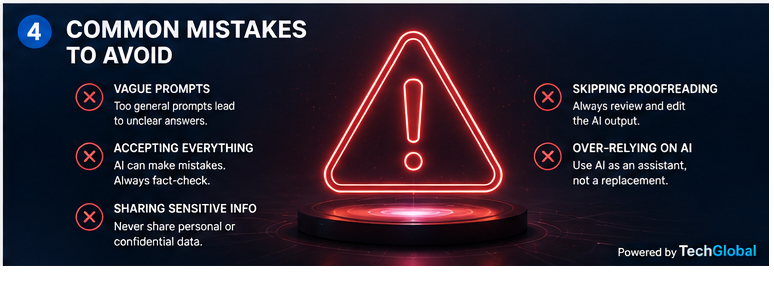
- Using vague prompts
- Accepting every answer without verification
- Sharing confidential information
- Skipping proofreading
- Expecting AI to replace human judgment
Conclusion

ChatGPT is more than a chatbot—it is a versatile productivity assistant that can help you write, learn, plan, and solve problems more efficiently. By using clear prompts, breaking tasks into steps, and reviewing AI-generated output carefully, you can make ChatGPT a valuable part of your daily workflow.
As AI continues to evolve, developing strong prompting and critical thinking skills will help you get the most from these tools while producing work that is accurate, useful, and uniquely your own.
Note: If you need more AI software beyond chatgpt check out our guide on the 25 Best AI Tools in 2026.
ChatGPT offers free access, with paid subscription options that provide additional features and higher usage limits.
Yes. It can help draft blog posts, but you should edit, fact-check, and personalize the content before publishing.
It can be a valuable learning aid for explaining concepts, generating practice questions, and organizing study material.
ChatGPT and search engines serve different purposes. Search engines are better for finding the latest information and official sources, while ChatGPT excels at explaining ideas and assisting with writing.